


Introduction
However, implementing such complex systems requires more than just selecting the right technologies; it demands a clear architectural vision that aligns business objectives with technical capabilities. This is where enterprise architecture frameworks like ArchiMate become invaluable. ArchiMate provides a standardized visual language for describing, analyzing, and communicating the relationships between business processes, application services, and technology infrastructure.
1. Problem Description
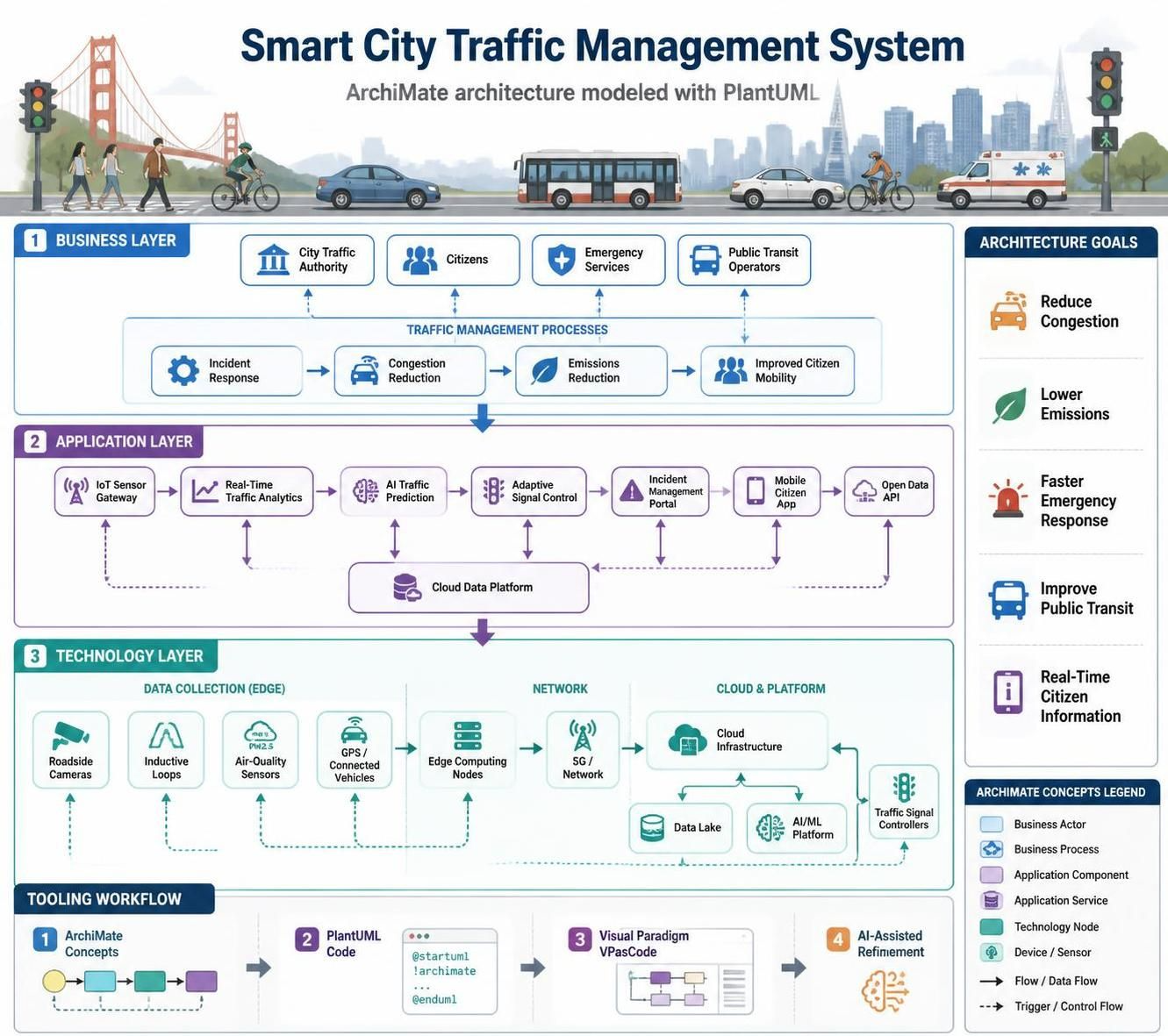
Smart City Traffic Management System
The City of San Francisco is implementing a Smart Traffic Management System to reduce congestion and improve traffic flow across the city. The system needs to:
-
Collect real-time traffic data from IoT sensors installed at major intersections
-
Process and analyze traffic patterns using AI algorithms
-
Provide dynamic traffic light optimization based on current conditions
-
Offer citizens real-time traffic information through a mobile application
-
Enable traffic management officials to monitor and control the system through a dashboard
-
Integrate with existing public transportation systems (buses, trains)
-
Generate reports for city planning and infrastructure improvements
Key stakeholders include:
-
Citizens/Commuters who need traffic information
-
Traffic Management Officials who operate the system
-
City Planning Department that uses analytics for decision-making
-
IT Operations team responsible for system maintenance
The system must handle high-volume data processing, ensure real-time responsiveness, maintain security, and integrate with legacy municipal systems.
2. ArchiMate-PlantUML Diagram
@startuml
!includeurl https://raw.githubusercontent.com/plantuml-stdlib/Archimate-PlantUML/master/Archimate.puml

' Define colors for clarity
skinparam backgroundColor #FEFECE
skinparam borderColor black
skinparam shadowing false

title Smart City Traffic Management System - ArchiMate View

' === BUSINESS LAYER ===

' Business Actors
Business_Actor(citizen, "Citizen/\nCommuter")
Business_Actor(traffic_official, "Traffic\nManagement\nOfficial")
Business_Actor(city_planner, "City\nPlanning\nDepartment")

' Business Roles
Business_Role(commuter_role, "Daily Commuter")
Business_Role(operator_role, "System Operator")
Business_Role(analyst_role, "Data Analyst")

' Business Processes
Business_Process(monitor_traffic, "Monitor\nTraffic Conditions")
Business_Process(optimize_signals, "Optimize\nTraffic Signals")
Business_Process(generate_reports, "Generate\nAnalytics Reports")
Business_Process(access_info, "Access Real-Time\nTraffic Information")

' Business Objects
Business_Object(traffic_data, "Traffic Data")
Business_Object(report, "Traffic Analytics\nReport")

' Relationships
Rel(citizen, commuter_role, "assigned-to")
Rel(traffic_official, operator_role, "assigned-to")
Rel(city_planner, analyst_role, "assigned-to")

Rel(commuter_role, access_info, "performs")
Rel(operator_role, monitor_traffic, "performs")
Rel(operator_role, optimize_signals, "performs")
Rel(analyst_role, generate_reports, "performs")

Rel(access_info, traffic_data, "reads")
Rel(monitor_traffic, traffic_data, "reads")
Rel(optimize_signals, traffic_data, "writes")
Rel(generate_reports, report, "creates")

' === APPLICATION LAYER ===

' Application Components
Application_Component(mobile_app, "Mobile\nTraffic App")
Application_Component(dashboard, "Management\nDashboard")
Application_Component(analytics_engine, "AI Analytics\nEngine")
Application_Component(signal_controller, "Signal\nOptimization\nService")
Application_Component(data_processor, "Real-Time Data\nProcessor")
Application_Component(api_gateway, "API Gateway")

' Application Functions
Application_Function(process_sensor_data, "Process Sensor\nData")
Application_Function(predict_patterns, "Predict Traffic\nPatterns")
Application_Function(control_signals, "Control Traffic\nSignals")
Application_Function(display_info, "Display Traffic\nInformation")
Application_Function(create_visualizations, "Create Data\nVisualizations")

' Application Interfaces
Application_Interface(mobile_api, "Mobile API")
Application_Interface(dashboard_api, "Dashboard API")
Application_Interface(sensor_api, "Sensor Data API")

' Relationships - Application Layer
Rel(mobile_app, mobile_api, "exposes")
Rel(dashboard, dashboard_api, "exposes")
Rel(data_processor, sensor_api, "exposes")

Rel(mobile_app, display_info, "realizes")
Rel(dashboard, create_visualizations, "realizes")
Rel(analytics_engine, predict_patterns, "realizes")
Rel(signal_controller, control_signals, "realizes")
Rel(data_processor, process_sensor_data, "realizes")

Rel(api_gateway, mobile_api, "serves")
Rel(api_gateway, dashboard_api, "serves")
Rel(api_gateway, sensor_api, "serves")

Rel(data_processor, analytics_engine, "flows-to")
Rel(analytics_engine, signal_controller, "triggers")

' === TECHNOLOGY LAYER ===

' Technology Nodes
Technology_Node(iot_sensors, "IoT Traffic\nSensors")
Technology_Node(cloud_infrastructure, "Cloud\nInfrastructure\n(AWS)")
Technology_Node(edge_computing, "Edge Computing\nNodes")

' Technology Services
Technology_Service(sensor_collection, "Sensor Data\nCollection")
Technology_Service(compute_service, "Compute Service")
Technology_Service(storage_service, "Data Storage\nService")
Technology_Service(network_service, "Network\nCommunication")

' System Software
System_Software(message_queue, "Message Queue\n(Kafka)")
System_Software(database, "Time-Series\nDatabase")
System_Software(ai_framework, "AI/ML Framework\n(TensorFlow)")

' Technology Interfaces
Technology_Interface(mqtt_protocol, "MQTT Protocol")
Technology_Interface(rest_api, "REST API")
Technology_Interface(websocket, "WebSocket")

' Relationships - Technology Layer
Rel(iot_sensors, sensor_collection, "provides")
Rel(cloud_infrastructure, compute_service, "hosts")
Rel(cloud_infrastructure, storage_service, "hosts")

Rel(sensor_collection, mqtt_protocol, "uses")
Rel(compute_service, rest_api, "uses")
Rel(network_service, websocket, "uses")

Rel(message_queue, network_service, "runs-on")
Rel(database, storage_service, "runs-on")
Rel(ai_framework, compute_service, "runs-on")

Rel(edge_computing, message_queue, "connects-to")
Rel(cloud_infrastructure, database, "manages")
Rel(cloud_infrastructure, ai_framework, "deploys")

' === CROSS-LAYER RELATIONSHIPS ===

' Business to Application
Rel(access_info, mobile_app, "used-by")
Rel(monitor_traffic, dashboard, "used-by")
Rel(optimize_signals, signal_controller, "used-by")
Rel(generate_reports, analytics_engine, "used-by")

' Application to Technology
Rel(mobile_app, api_gateway, "runs-on")
Rel(dashboard, api_gateway, "runs-on")
Rel(data_processor, message_queue, "uses")
Rel(analytics_engine, ai_framework, "uses")
Rel(data_processor, database, "uses")
Rel(signal_controller, rest_api, "uses")

' Business to Technology (indirect through applications)
Rel(citizen, mobile_app, "interacts-with")
Rel(traffic_official, dashboard, "interacts-with")

note bottom of citizen
  Accesses traffic info
  via mobile app
end note

note bottom of traffic_official
  Monitors and controls
  traffic system
end note

note right of iot_sensors
  Installed at major
  intersections
end note

@enduml
3. Explanation and Interpretation
Architecture Overview
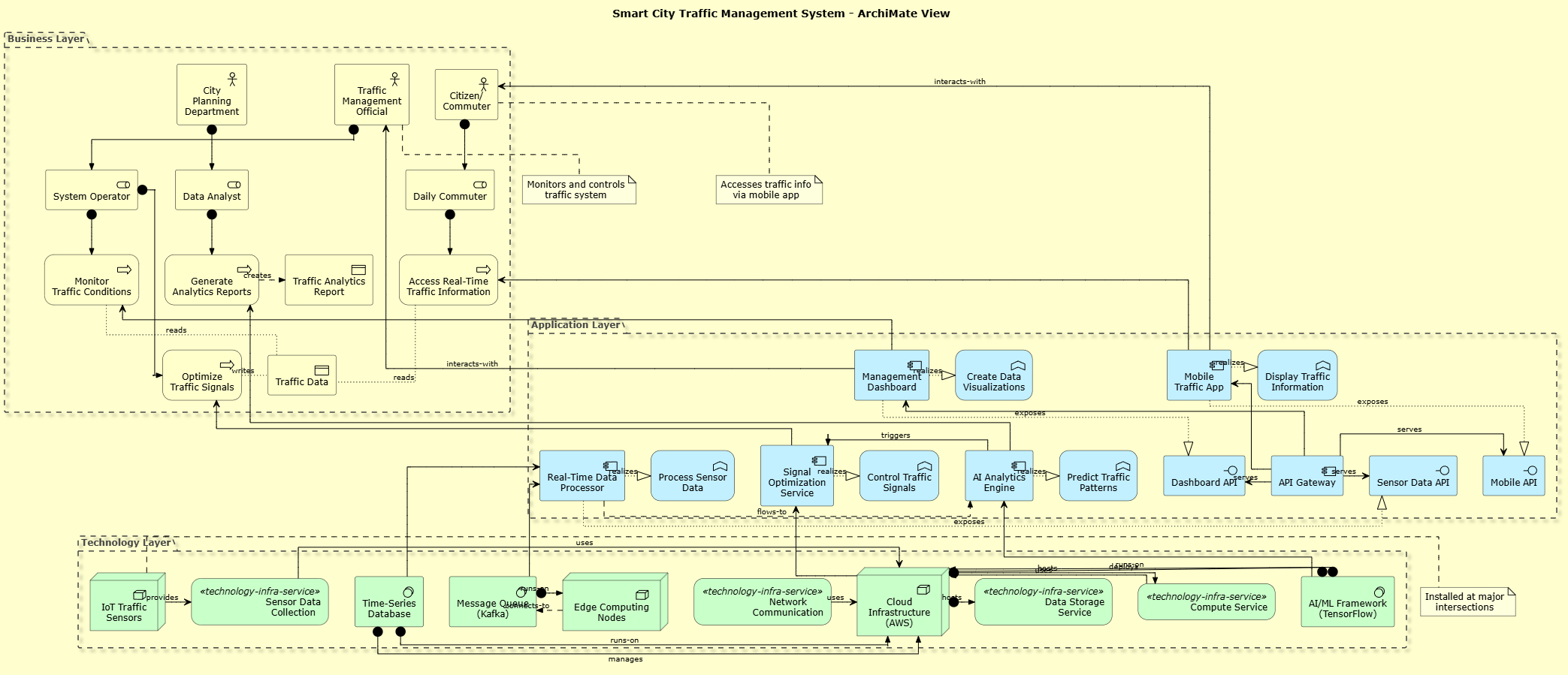
This ArchiMate diagram presents a three-layer architecture for the Smart City Traffic Management System:
Business Layer (Top)
-
Actors: Three primary stakeholders – Citizens (commuters), Traffic Management Officials, and City Planners
-
Processes: Key business processes including monitoring traffic, optimizing signals, generating reports, and accessing information
-
Objects: Traffic data (input) and analytics reports (output)
-
Purpose: Defines what the organization does and who performs these activities
Application Layer (Middle)
-
Components: Five main application services:
-
Mobile Traffic App (citizen-facing)
-
Management Dashboard (official-facing)
-
AI Analytics Engine (pattern prediction)
-
Signal Optimization Service (traffic control)
-
Real-Time Data Processor (data ingestion)
-
-
Interfaces: APIs that enable communication between components and external systems
-
Functions: Specific capabilities each component provides
-
Purpose: Shows how business processes are automated and supported
Technology Layer (Bottom)
-
Nodes: Physical/digital infrastructure including IoT sensors, cloud infrastructure (AWS), and edge computing nodes
-
Services: Technical services like sensor collection, compute, storage, and networking
-
System Software: Message queues (Kafka), time-series databases, and AI frameworks (TensorFlow)
-
Purpose: Defines the technical foundation supporting the applications
Key Relationships
-
Vertical Integration: Each layer supports the one above it
-
Technology enables Applications
-
Applications enable Business processes
-
-
Data Flow:
-
IoT sensors → Message Queue → Data Processor → Database
-
Data Processor → Analytics Engine → Signal Controller
-
Analytics Engine → Dashboard & Mobile App
-
-
User Interaction:
-
Citizens interact with Mobile App via REST API
-
Officials use Dashboard for monitoring and control
-
Both access real-time data processed through the system
-
Architectural Principles Demonstrated
-
Separation of Concerns: Clear layering prevents tight coupling
-
Scalability: Cloud infrastructure and message queuing support high volume
-
Real-time Processing: Edge computing reduces latency for critical decisions
-
API-First Design: Standardized interfaces enable integration
-
Event-Driven Architecture: Kafka enables asynchronous, scalable data processing
Benefits of This Architecture
-
Modularity: Components can be updated independently
-
Scalability: Cloud-based infrastructure handles variable loads
-
Maintainability: Clear boundaries make troubleshooting easier
-
Extensibility: New features can be added without disrupting existing services
-
Security: API gateway provides centralized security controls
4. Tooling: Visual Paradigm VPasCode + AI Assisted
Using Visual Paradigm with VPasCode
Setup Steps:
-
Install Visual Paradigm (Community or Professional Edition)
-
Enable VPasCode Plugin:
-
Go to Tools > Plugin Manager
-
Install VPasCode extension
-
Restart Visual Paradigm
-
-
Create ArchiMate Project:
-
File > New Project > ArchiMate
-
Select appropriate framework version (ArchiMate 3.1 recommended)
-
-
Import PlantUML Code:
-
Open VPasCode editor (View > VPasCode)
-
Paste the PlantUML code above
-
Click “Render” to generate the diagram
-
The tool will automatically create ArchiMate elements in your project
-
AI-Assisted Modeling Workflow
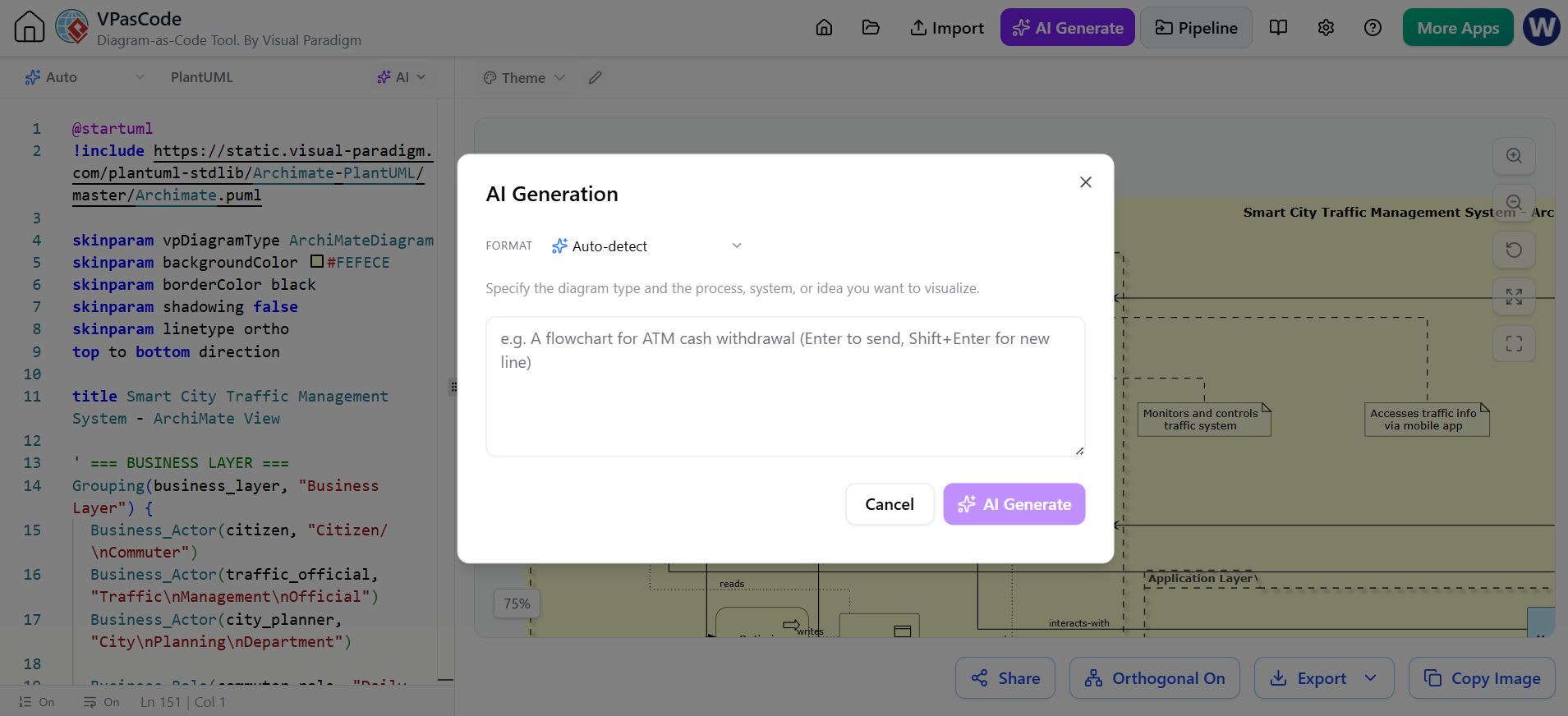
Step 1: Requirements Analysis with AI
Prompt: "Analyze these requirements for a traffic management system and identify
key business actors, processes, and application components..."
Step 2: Architecture Pattern Selection
Prompt: "Recommend an ArchiMate architecture pattern for a real-time IoT system
with cloud backend and mobile frontend..."
Step 3: Element Generation
Prompt: "Generate ArchiMate elements for the following application services:
mobile app, dashboard, analytics engine, signal controller, data processor..."
Step 4: Relationship Mapping
Prompt: "Define relationships between these ArchiMate elements following
best practices for service-oriented architecture..."
Step 5: Validation and Optimization
Prompt: "Review this ArchiMate diagram for completeness, consistency, and
adherence to ArchiMate modeling principles..."
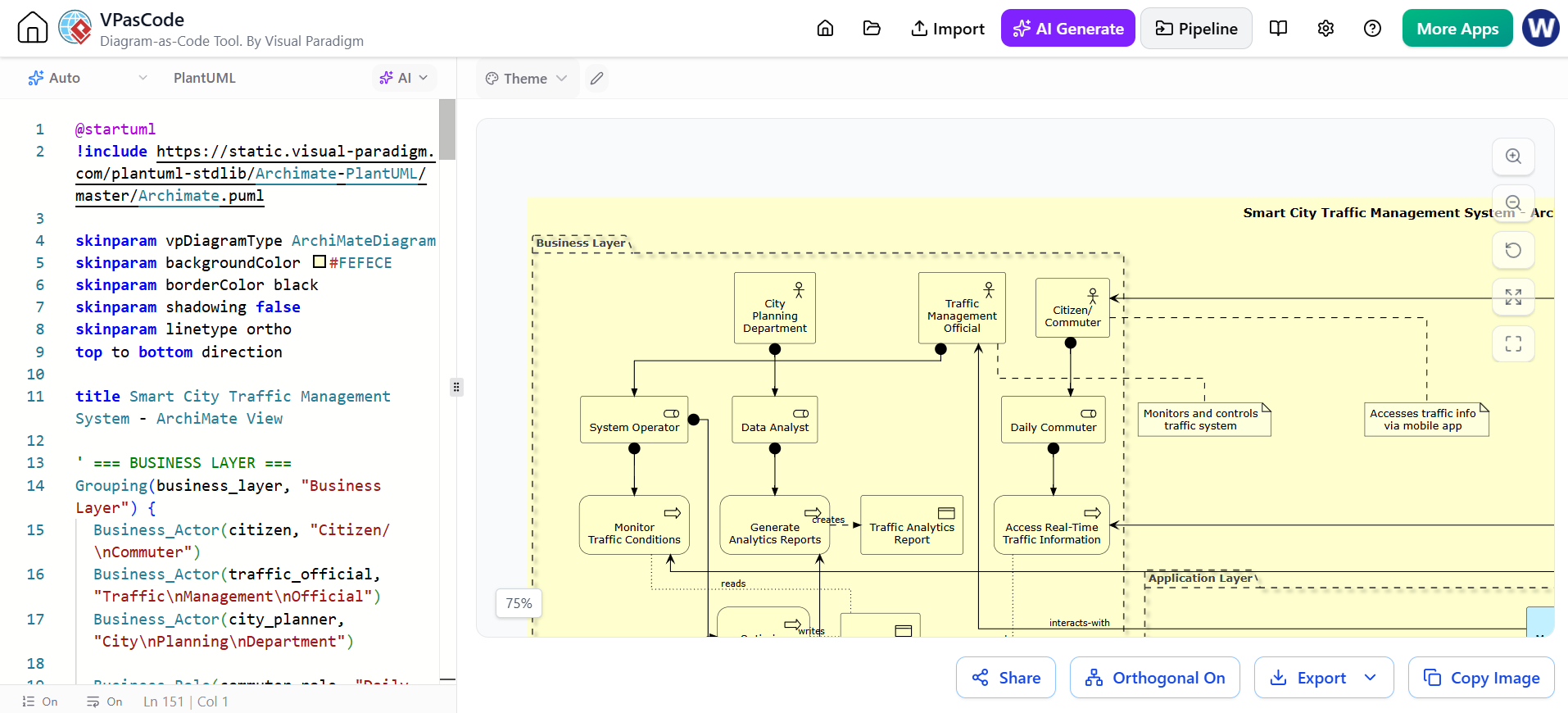
VPasCode Features for ArchiMate
-
Syntax Highlighting: Color-coded ArchiMate element types
-
Auto-completion: Suggests valid ArchiMate relationships
-
Real-time Preview: Instant diagram rendering as you type
-
Error Detection: Validates ArchiMate syntax rules
-
Template Library: Pre-built patterns for common architectures
-
Export Options: PNG, SVG, PDF, and native VP format
Best Practices When Using AI + VPasCode
-
Iterative Refinement: Start with high-level structure, then add details
-
Validation: Always review AI-generated models for accuracy
-
Consistency: Use consistent naming conventions across layers
-
Documentation: Add notes and descriptions to clarify complex relationships
-
Version Control: Save iterations to track architectural evolution
-
Stakeholder Review: Share diagrams with business users for validation