
Introduction
ArchiMate is an open and independent modeling language for Enterprise Architecture (EA), developed by The Open Group. It provides a standardized way to visualize, describe, and analyze the architecture of complex systems within an organization. By , ArchiMate helps organizations drive better outcomes, improve communication, and support strategic decision-making.
This guide covers:
- What ArchiMate is and why it matters
- How ArchiMate works: layers, elements, and relationships
- Strengths and challenges of ArchiMate
- How addresses key disadvantages
- Best practices for effective ArchiMate modeling
Why Use ArchiMate?
Using a modeling language like ArchiMate offers several benefits:
- Standardization and Consistency: A unified set of concepts and notations ensures clarity and reduces ambiguity.
- Improved Communication: Tailored visual diagrams help stakeholders understand complex architectures.
- Comprehensive Analysis: Identify interdependencies, gaps, and risks across business, application, and technology layers.
- Enhanced Planning: Supports roadmapping, scenario planning, and resource optimization.
- Governance and Compliance: Ensures adherence to regulations and organizational policies.
- Efficiency and Cost Savings: Optimizes resources and reduces redundancy.
- Risk Management: Facilitates risk identification and change management.
- Digital Transformation: Supports agile and modern EA practices.
How Does ArchiMate Work?
1. Layers
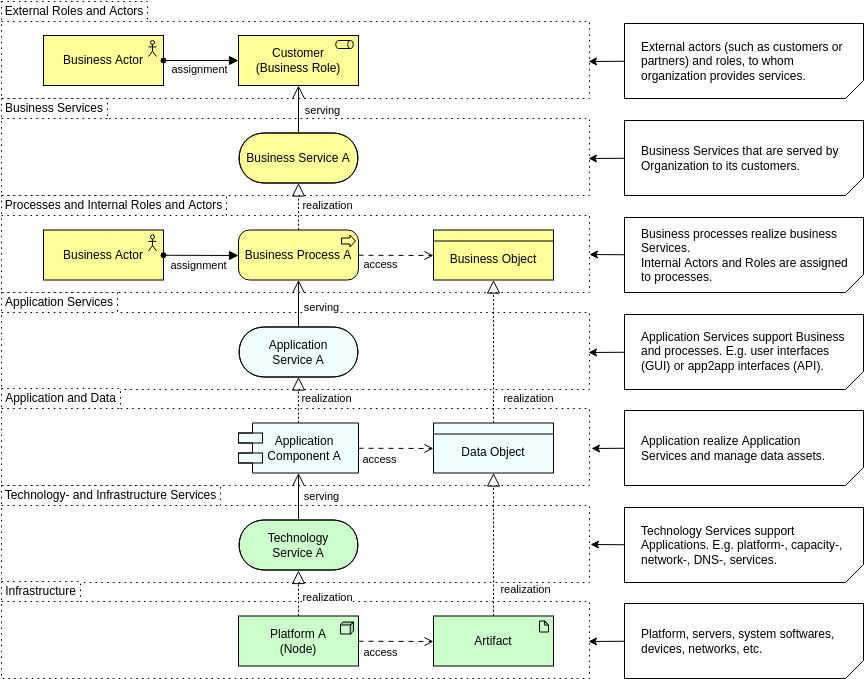
ArchiMate divides Enterprise Architecture into three core layers:
| Layer | Focus |
|---|---|
| Business Layer | Business processes, roles, goals, and organizational structures. |
| Application Layer | Applications and their interactions. |
| Technology Layer | Hardware, networks, and middleware supporting applications. |
2. Extensions
Additional modeling capabilities can be added to address specific concerns:
- Motivation Extension: Captures goals, principles, and requirements.
- Implementation and Migration Extension: Supports planning and transition activities.
- Strategy Layer Extension: Focuses on high-level strategic elements like business capabilities and value streams.
3. Elements
Elements are the building blocks of ArchiMate:
- Active Structure Elements: Resources that exhibit behavior (e.g., roles, systems).
- Behavior Elements: Units of activity performed by active elements (e.g., processes, functions).
- Passive Structure Elements: Objects on which behavior is performed (e.g., data, contracts).
4. Relationships
Relationships define how elements interact:
- Structural Relationships: Show architectural structure (e.g., composition, aggregation).
- Dependency Relationships: Highlight dependencies between elements.
- Dynamic Relationships: Represent temporal or causal connections.
- Other Relationships: Include associations or specializations.
5. Aspects and Viewpoints
- Aspects: Provide different views of architecture components (e.g., security, performance).
- Viewpoints: Tailored perspectives for stakeholders, ensuring relevant and comprehensible models.
Strengths and Disadvantages of ArchiMate
Strengths
✅ Standardized and Versatile: An international, vendor-independent language. ✅ Excellent Visualization: Enhances stakeholder communication with clear, tailored diagrams. ✅ Strong Analysis Capabilities: Supports detailed modeling and integrates with EA tools.
Disadvantages and How Visual Paradigm’s AI Helps Overcome Them
| Disadvantage | How Visual Paradigm’s AI Addresses It | Review and Suggestions |
|---|---|---|
| Steep Learning Curve | AI-powered diagram generation simplifies the creation of ArchiMate models, reducing the need for extensive training. | Suggestion: Use Visual Paradigm’s AI to auto-generate diagrams from text descriptions, making it easier for beginners to get started. |
| High-Level Abstraction | AI can suggest detailed elements and relationships, ensuring technical depth is not overlooked. | Suggestion: Combine AI-generated diagrams with manual reviews to ensure accuracy and completeness. |
| Limited Customization | AI tools allow for flexible adjustments and customization of models, adapting to unique organizational needs. | Suggestion: Leverage AI to create templates that align with specific industry standards or organizational requirements. |
| Dependency on Specialized Tools | Visual Paradigm’s AI integrates seamlessly with ArchiMate, reducing the complexity of using multiple tools. | Suggestion: Use AI to automate repetitive tasks, such as updating models or generating reports. |
Review: Visual Paradigm’s AI-Powered ArchiMate Diagram Generation
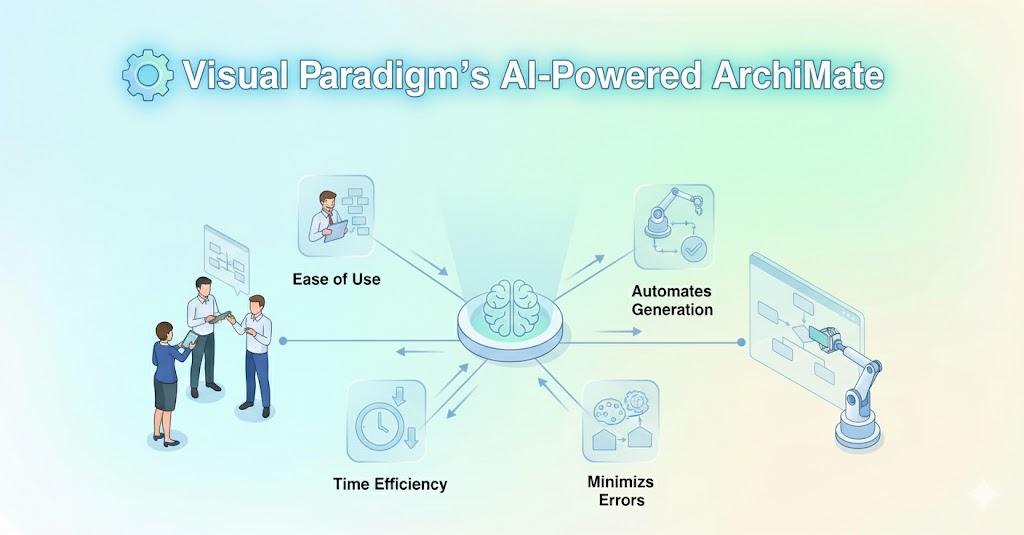
Pros:
- Ease of Use: AI simplifies the creation of complex ArchiMate diagrams, making it accessible to users with varying levels of expertise.
- Time Efficiency: Automates the generation of diagrams, saving time and reducing manual effort.
- Accuracy: AI suggests relationships and elements based on best practices, minimizing errors.
- Customization: Allows users to tailor diagrams to specific needs, enhancing flexibility.
Cons:
- : AI-generated diagrams may require manual refinement to fully align with unique business contexts.
- : Organizations must invest in Visual Paradigm, which may not be feasible for all budgets.
Suggestions for Improvement:
- : Expand the AI’s knowledge base to better understand industry-specific nuances and terminologies.
- : Integrate real-time collaboration tools to allow teams to work together on AI-generated diagrams.
- : Include AI-driven validation to ensure diagrams comply with ArchiMate standards and organizational policies.
- : Implement a feedback mechanism to continuously improve AI suggestions based on user input.
ArchiMate in Practice: Industry Use Cases
ArchiMate is widely adopted in industries such as:
- : Mapping complex IT landscapes and ensuring regulatory compliance.
- : Strategic planning and public service optimization.
- : Managing intricate network architectures.
- : Standard tool for advising on EA practices.
ArchiMate vs. TOGAF
Both are developed by The Open Group but serve different purposes:
| ArchiMate | TOGAF |
|---|---|
| Provides detailed visualizations and modeling. | Offers a comprehensive EA framework (ADM methodology). |
| Focuses on standardized modeling. | Emphasizes process and methodology. |
| Complements TOGAF by adding detailed models. | Guides EA development with a structured approach. |
Complementary Use:
- TOGAF provides the overarching framework.
- ArchiMate delivers the visualizations and modeling capabilities.
7 Best Practices for Effective ArchiMate Modeling
- : Identify stakeholders and objectives.
- : Use ArchiMate’s layered approach with consistent naming conventions.
- : Use tools like Visual Paradigm for real-time insights.
- : Implement version control and real-time collaboration.
- : Adapt the model as the organization evolves.
- : Use analytics for quick reporting and decision-making.
- : Refine models iteratively to align with business changes.
FAQs About ArchiMate
What Is ArchiMate?
An open-standard EA modeling language for describing, analyzing, and visualizing relationships among business domains.
What Are the Key Concepts?
- Layers, Elements, Relationships, Aspects, and Viewpoints.
How Does ArchiMate Integrate With Other Frameworks?
It integrates with TOGAF, IT4IT, BPMN, COBIT, ITIL, and more, enhancing consistency and communication.
Does an Enterprise Architect Need ArchiMate?
While not strictly necessary, ArchiMate provides between IT and business strategies, making it highly valuable for modern EA practices.
Conclusion
ArchiMate is a powerful tool for Enterprise Architects, offering a structured approach to modeling complex systems. By combining it with frameworks like TOGAF and leveraging AI-powered tools like Visual Paradigm, organizations can achieve better alignment, communication, and strategic outcomes.
Would you like a for ArchiMate modeling, or do you have questions about ?
Visual Paradigm Tools and Resources for ArchiMate Modeling
Visual Paradigm is a leading, Open Group-certified tool for ArchiMate (supporting up to version 3.2 as of December 2025). It offers robust features like full notation support, viewpoint management, TOGAF integration, and innovative AI-powered diagram generation for rapid prototyping.
Key Tools in Visual Paradigm for ArchiMate
- Desktop Edition (Enterprise recommended): Full-featured for professional modeling, including AI Diagram Generator for ArchiMate, custom viewpoints, resource catalogs, and real-time collaboration.
- Visual Paradigm Online (Free Edition available): Web-based tool for quick ArchiMate diagrams – ideal for beginners or lightweight use. Supports drag-and-drop and templates.
- AI Diagram Generator & Chatbot: Generate compliant ArchiMate diagrams and all official viewpoints instantly from text prompts (e.g., “Model a coffee shop’s business layer with SaaS support”). Refine iteratively via natural language.
- TOGAF ADM Guide-Through: Integrates ArchiMate modeling directly into TOGAF phases for structured enterprise architecture development.
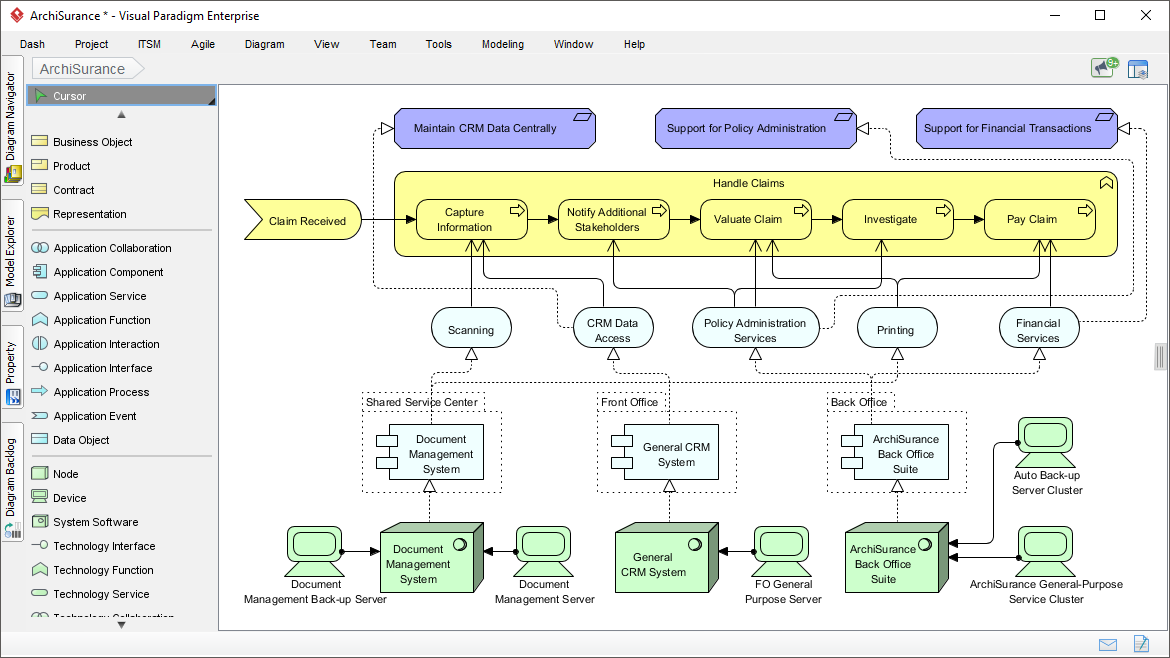
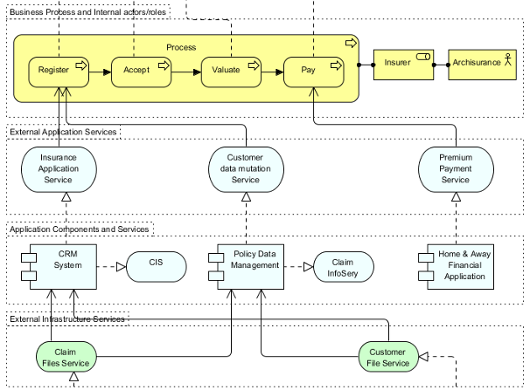
Here are some example screenshots of ArchiMate diagrams and the interface in Visual Paradigm:


Recommended Articles and Tutorials
These official Visual Paradigm resources provide step-by-step guidance, examples, and best practices:
- Comprehensive Tutorial on ArchiMate – In-depth overview of layers, elements, relationships, and useful diagram types with examples. Link: https://guides.visual-paradigm.com/comprehensive-tutorial-on-archimate/
- Full ArchiMate Viewpoints Guide (with Examples) – Detailed handbook covering all 23 official viewpoints, complete with diagram examples drawn in Visual Paradigm. Link: https://www.visual-paradigm.com/guide/archimate/full-archimate-viewpoints-guide/
- ArchiMate Diagram Tutorial – Step-by-step guide on creating diagrams, including online tool access. Link: https://online.visual-paradigm.com/diagrams/tutorials/archimate-tutorial/
- How to Draw ArchiMate Diagrams – Practical tutorial with notations and sample creation. Link: https://www.visual-paradigm.com/tutorials/how-to-draw-archimate-diagram.jsp
- Generate ArchiMate Diagrams and Viewpoints Instantly with AI – Explains the new AI feature for fast generation (updated December 2025). Link: https://updates.visual-paradigm.com/releases/ai-archimate-viewpoints-generator/
- Using ArchiMate with TOGAF ADM – Integration guide for structured EA processes. Link: https://www.visual-paradigm.com/guide/archimate/using-archimate-tool-with-togaf-adm/
Start with the free online tool or trial the desktop version to experiment with the “Coffee Around The Corner” case study – the AI generator can create a baseline model from a simple prompt!