Introduction: Why This Journey Matters
In today’s data-driven world, the ability to design and build a robust database application is a foundational skill for developers, software engineers, and even product designers. Whether you’re building a simple to-do app, an online bookstore, or a customer management system, your application’s success hinges on how well its data is structured and stored.
This guide walks you through the complete journey from conceptual modeling to physical database implementation, using a proven, step-by-step approach that bridges object-oriented thinking with relational database design. We’ll explore the full pipeline:
-
Start with a UML Class Diagram (to model your domain),
-
Transform it into an Entity-Relationship Diagram (ERD) (to design the data model),
-
Implement it as a real database using SQL DDL.
We’ll also show how modern tools like Visual Paradigm’s AI DB Modeler can automate and accelerate this entire process — making it accessible even for absolute beginners.
By the end of this article, you’ll understand not just how to build a database, but why each step matters — empowering you to design scalable, maintainable, and efficient applications.
Step 1: Start with Requirements — Build a UML Class Diagram (Conceptual Model)
What Is a UML Class Diagram?
A UML (Unified Modeling Language) Class Diagram is a visual representation of your application’s domain — capturing the key objects, their attributes, and how they relate to one another. It’s the first step in object-oriented analysis and design (OOAD).
✅ Purpose: Model the real-world concepts your app will manage — not code, not tables, but meaningful entities.
How to Build It (Manual Approach)
1. Gather Requirements
Begin by writing down what your app does. For example:
“An online bookstore where customers can browse books, place orders, leave reviews, and track shipments.”
2. Identify Nouns → Potential Classes
Scan your requirements for key concepts:
-
Customer -
Book -
Order -
OrderItem -
Review -
Author -
Publisher
These become your candidate classes.
3. Identify Verbs → Relationships
Look for actions or connections:
-
“Customer places Order” →
Customer→Order(1:N) -
“Order contains OrderItem” →
Order→OrderItem(1:N) -
“Book written by Author” →
Book↔Author(1:N) -
“Book has multiple Reviews” →
Book↔Review(1:N)
4. Define Attributes
Assign meaningful properties:
-
Customer:name,email,address,phone -
Book:title,ISBN,price,publicationYear,genre -
Order:orderDate,status,totalAmount -
Review:rating,comment,reviewDate
5. Define Relationships & Multiplicity
Draw lines between classes and specify cardinality:
-
Customer— (1) — (N) —Order -
Order— (1) — (N) —OrderItem -
Book— (1) — (N) —Review -
Book— (1) — (N) —Author(or M:N if multiple authors)
📌 Tip: Use tools like Visual Paradigm to sketch your diagram. Avoid overcomplicating — focus on persistent data, not methods.
6. Common Pitfalls to Avoid
-
❌ Adding methods too early (e.g.,
placeOrder()): Save behavior for code, not the data model. -
❌ Forgetting multiplicity: A missing
1..*can break your design later. -
❌ Including transient classes: e.g.,
ShoppingCartthat doesn’t persist — don’t model it unless it’s stored.
✅ Pro Tip: Start simple. Try modeling a library system or todo list first before tackling complex apps.
Step 2: From UML to ERD — Build the Logical Data Model
Now that you have a conceptual model, it’s time to transform it into a data-centric model suitable for databases: the Entity-Relationship Diagram (ERD).
Why Convert to ERD?
While UML is great for object-oriented design, ERD is optimized for relational databases. It focuses on:
-
Persistent data
-
Keys (PK/FK)
-
Constraints
-
Relationships without behavior
Key Differences Between UML and ERD
| Feature | UML Class Diagram | ERD (Logical Model) |
|---|---|---|
| Entities | Classes | Entities |
| Attributes | With visibility (public/private) | Only data (no visibility) |
| Relationships | Associations with multiplicity | Relationships with cardinality |
| Many-to-Many (M:N) | Direct link (risky) | Must be resolved via junction table |
| Inheritance | Supported (generalization) | Flattened or handled via inheritance patterns |
| Keys | Rarely defined | Explicit PK, FK, UNIQUE constraints |
| Operations | Present (methods) | Absent (pure data model) |
How to Transform: Step-by-Step
-
Map Classes → Entities
Only persistent, long-lived data classes become entities. -
Map Attributes → Columns
Keep only relevant attributes. For example:-
Customer.name→name VARCHAR(100) -
Book.ISBN→isbn VARCHAR(13)(standard format)
-
-
Handle Relationships
-
1:1 → Add a foreign key in one entity (or share PK)
-
1:N → Add FK in the “many” side
-
M:N → Create a junction table (e.g.,
OrderItemforOrder↔Book)
🔥 Biggest Gap: M:N relationships must be resolved.
Example:OrderandBookhave an M:N relationship → createOrderItemwithorderId,bookId,quantity,price. -
-
Define Keys
-
Add Primary Keys (PK) — ideally a surrogate key like
id INT AUTO_INCREMENT. -
Add Foreign Keys (FK) — reference PKs of related tables.
-
-
Refine Data Types
-
String→VARCHAR(n) -
Integer→INT -
Date→DATEorTIMESTAMP
-
-
Draw the ERD
Use crow’s foot notation (common in textbooks) or Chen notation. Tools like Visual Paradigm, dbdiagram.io, or draw.io make this easy.
✅ Example:
Order(PK:id,orderDate,customerId)
OrderItem(PK:id,orderId,bookId,quantity,price)
Book(PK:id,title,isbn,price)
Order.orderId → OrderItem.orderId(FK)
📌 Best Practice: Aim for 3NF (Third Normal Form) — eliminate redundancy and anomalies.
Step 3: From ERD to Physical Database — Implement with SQL DDL
Now that you have a solid logical model, it’s time to build the actual database using SQL.
What Is Physical Database Implementation?
This is where your ERD becomes real — a working database schema in a relational database management system (RDBMS) like PostgreSQL, MySQL, or SQL Server.
Key Transformation Steps
| ERD Element | Physical Implementation |
|---|---|
| Entity | CREATE TABLE entity_name (...) |
| Attribute | column_name data_type constraints |
| Primary Key | PRIMARY KEY (column) |
| Foreign Key | FOREIGN KEY (col) REFERENCES other_table(pk) |
| Indexes | CREATE INDEX idx_name ON table(col) |
| Constraints | NOT NULL, UNIQUE, CHECK, DEFAULT |
Step-by-Step SQL DDL Generation
Let’s generate the schema for our bookstore:
-- 1. Create Authors
CREATE TABLE author (
    id SERIAL PRIMARY KEY,
    name VARCHAR(100) NOT NULL,
    birth_date DATE
);

-- 2. Create Books
CREATE TABLE book (
    id SERIAL PRIMARY KEY,
    title VARCHAR(255) NOT NULL,
    isbn VARCHAR(13) UNIQUE NOT NULL,
    price DECIMAL(10,2) NOT NULL,
    publication_year INT,
    author_id INT NOT NULL,
    FOREIGN KEY (author_id) REFERENCES author(id)
);

-- 3. Create Customers
CREATE TABLE customer (
    id SERIAL PRIMARY KEY,
    name VARCHAR(100) NOT NULL,
    email VARCHAR(255) UNIQUE NOT NULL,
    address TEXT
);

-- 4. Create Orders
CREATE TABLE `order` (
    id SERIAL PRIMARY KEY,
    customer_id INT NOT NULL,
    order_date TIMESTAMP DEFAULT CURRENT_TIMESTAMP,
    status VARCHAR(20) DEFAULT 'pending',
    total_amount DECIMAL(10,2) NOT NULL,
    FOREIGN KEY (customer_id) REFERENCES customer(id)
);

-- 5. Create OrderItems (junction table)
CREATE TABLE order_item (
    id SERIAL PRIMARY KEY,
    order_id INT NOT NULL,
    book_id INT NOT NULL,
    quantity INT NOT NULL CHECK (quantity > 0),
    price DECIMAL(10,2) NOT NULL,
    FOREIGN KEY (order_id) REFERENCES `order`(id) ON DELETE CASCADE,
    FOREIGN KEY (book_id) REFERENCES book(id) ON DELETE CASCADE
);

-- 6. Create Reviews
CREATE TABLE review (
    id SERIAL PRIMARY KEY,
    book_id INT NOT NULL,
    customer_id INT NOT NULL,
    rating INT NOT NULL CHECK (rating BETWEEN 1 AND 5),
    comment TEXT,
    review_date TIMESTAMP DEFAULT CURRENT_TIMESTAMP,
    FOREIGN KEY (book_id) REFERENCES book(id),
    FOREIGN KEY (customer_id) REFERENCES customer(id),
    UNIQUE (book_id, customer_id) -- one review per customer per book
);

-- 7. Add indexes for performance
CREATE INDEX idx_order_customer ON `order`(customer_id);
CREATE INDEX idx_order_item_order ON order_item(order_id);
CREATE INDEX idx_review_book ON review(book_id);
✅ Test It: Run these SQL commands in your local database (e.g., PostgreSQL via
psqlor MySQL Workbench). Insert sample data and run queries like:
SELECT c.name, b.title, o.order_date
FROM customer c
JOIN `order` o ON c.id = o.customer_id
JOIN order_item oi ON o.id = oi.order_id
JOIN book b ON oi.book_id = b.id;
How AI Tools Like Visual Paradigm’s DBModeler AI Simplify Everything
While the manual process teaches deep understanding, it can be time-consuming and error-prone — especially for beginners.
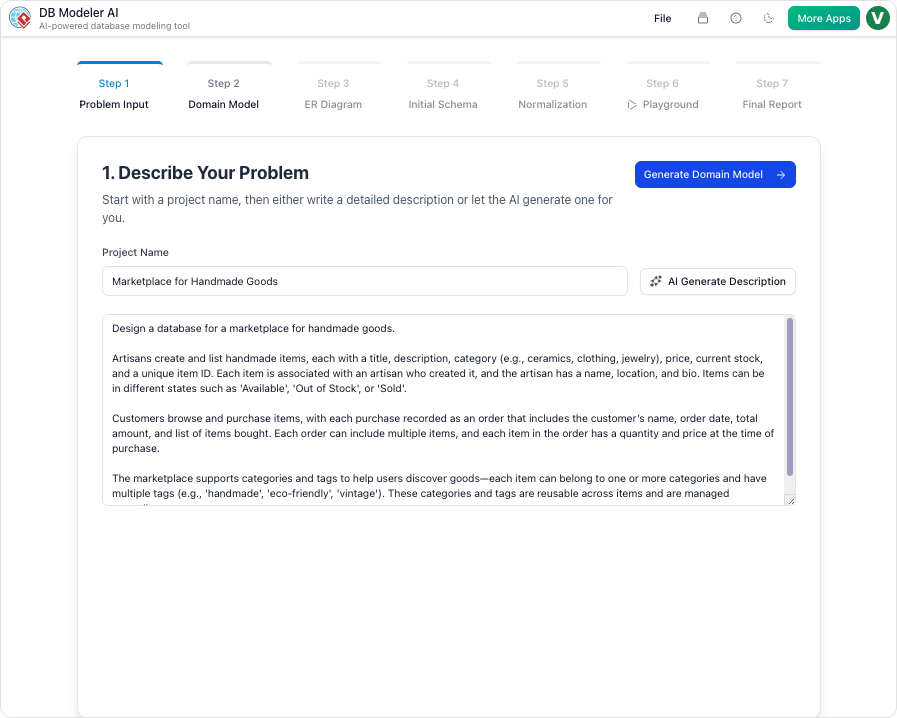
Enter Visual Paradigm’s AI DB Modeler — a browser-based tool that automates the entire pipeline using artificial intelligence.
The 7-Step AI Workflow
-
Problem Input
Describe your app in plain English:
“I want a bookstore where customers can order books and leave reviews.”
→ AI understands and expands it. -
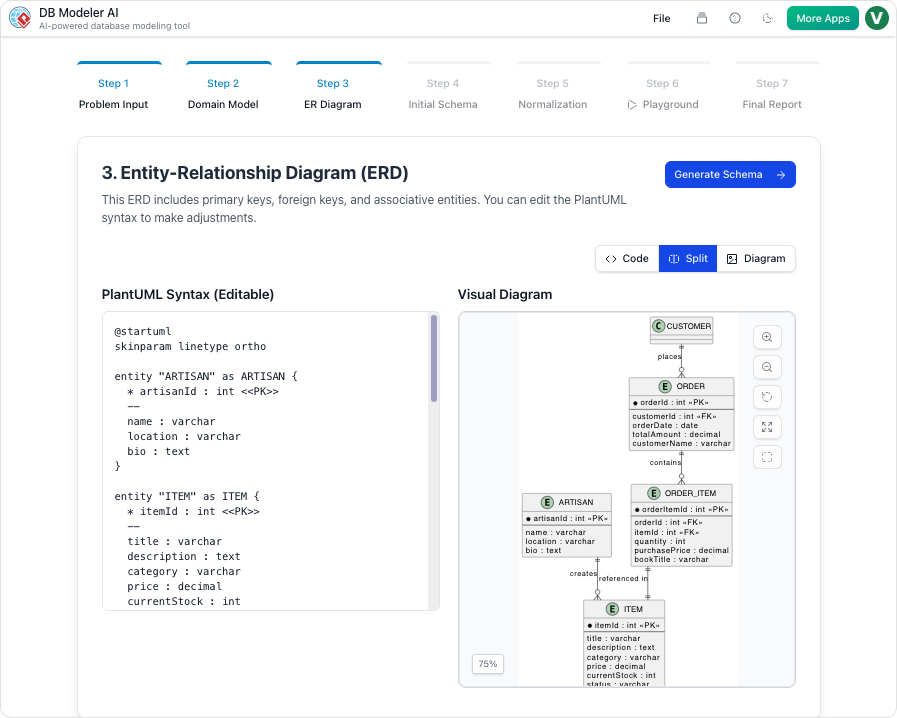
Generate UML Class Diagram
AI creates a PlantUML-based domain model with classes, attributes, and relationships.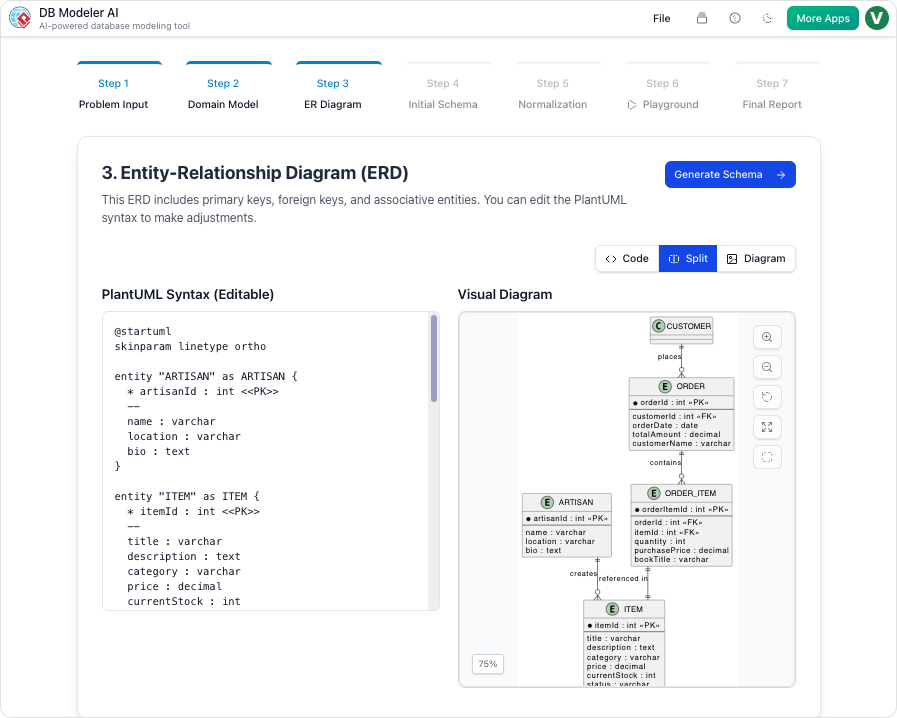
-
Auto-Convert to ERD
AI transforms the class diagram into a full ERD — resolving M:N relationships, adding PK/FK, and enforcing normalization. -
Generate SQL DDL
Instantly produces executableCREATE TABLEstatements (PostgreSQL, MySQL, etc.). -
Intelligent Normalization
AI checks for anomalies and suggests improvements (e.g., splitting tables, adding constraints). -
Iterate with AI Chatbot
Ask: “Add audit columns (created_at, updated_at) to all tables.”
→ AI updates the model and schema instantly. -
Live SQL Playground & Export
Test queries in-browser, generate reports, export SQL, diagrams, or documentation.
✅ Why It’s Great for Beginners:
-
No need to learn UML or ERD rules manually.
-
Avoids common mistakes (e.g., missing FKs, wrong cardinality).
-
Fast iteration: go from idea to working database in under 10 minutes.
-
Free trial available — no installation required.
🔗 Access: ai.visual-paradigm.com/tool/dbmodeler-ai
Conclusion: Build Smarter, Faster, with Confidence
Designing a database application is not just about writing SQL — it’s about thinking clearly about your data. The journey from requirements → UML → ERD → SQL is a powerful framework that teaches you to:
-
Think like a domain expert,
-
Model relationships accurately,
-
Avoid design flaws early,
-
Build scalable, maintainable systems.
Whether you choose the manual method (for learning) or AI-assisted tools like Visual Paradigm’s DBModeler AI (for speed and accuracy), you’re equipping yourself with a skill that’s essential across web, mobile, and enterprise development.
🚀 Start Simple: Build a library catalog, todo list, or event planner using this process.
🔁 Iterate: Refine your model, add constraints, and test queries.
🌟 Scale Up: Apply the same principles to complex systems like e-commerce, social networks, or analytics platforms.
Remember: Great software starts with great data design.
Now go build something real — one table at a time.
Articles and resources
- AI-Powered Visual Modeling and Design Solutions by Visual Paradigm: This portal serves as a central hub to explore cutting-edge AI-driven tools for visual modeling, diagramming, and software design, enabling faster and smarter development workflows.
- AI-Powered Database Modeling with DBModeler AI: This article introduces DBModeler AI, a feature that enables intelligent database schema design and automated modeling within the Visual Paradigm platform.
- DBModeler AI: Intelligent Database Modeling Tool: A dedicated resource page for the AI-driven tool used for automated database modeling and schema generation.
- The Comprehensive Guide to DBModeler AI: Transforming Database Design with AI: This guide explores how the tool combines expert guidance and visual diagramming with live SQL testing in the browser to refine designs instantly.
- DBModeler AI: 7-Step Workflow for Data Modeling: A technical overview of the tool’s 7-step workflow, which generates domain models, ER diagrams, and normalized schemas from simple text inputs.
- AI Table Generator: From Natural Language to Executable Code: This guide walks users through transforming natural language descriptions into fully functional database tables and executable code.
- Introduction to Data Modeling with Visual Paradigm: ERD, Code Generation & Reverse Engineering: An introductory guide covering ERD creation, code generation, and reverse engineering from databases using the platform’s AI-enhanced environment.
- Streamlining Entity-Relationship Modeling with Visual Paradigm: Learn how the platform simplifies the process of designing and implementing entity-relationship models from initial concept to database deployment.
- Latest Release: DBModeler AI Enhancements: This release announcement details the newest features and improvements to the DBModeler AI engine for better data modeling accuracy.
- Comprehensive Review of DBModeler AI for Schema Design: A detailed analysis of how the AI-powered modeler transforms traditional schema design through automation and intelligence.