
The concept of viewpoints is central to using ArchiMate effectively, as they are the primary mechanism for supporting effective and coherent communication within Enterprise Architecture (EA),. ArchiMate viewpoints define the necessary abstractions required to convey specific architectural information to diverse stakeholders,.
I. Fundamentals of ArchiMate Viewpoints
In the practice of Enterprise Architecture, where communication is more than half of the work, models are often complex and multidimensional,. An architecture viewpoint helps manage this complexity:
- Model vs. View vs. Viewpoint: A model is a simplified or abstract representation of something, while a view is a subset of the model,. An architecture viewpoint is the specification of the conventions used to produce an architecture view,. Simply put, the view is what you see, and the viewpoint is where you are looking from.
- Purpose: A viewpoint is a set of conventions that produces an architecture view (which could be a diagram, catalog, or matrix) designed to answer a known concern from a known set of stakeholders. The idea of architecture viewpoints is borrowed from the ISO/IEC 42010 standard.
- Stakeholder Focus: Since the architecture description targets multiple stakeholders (e.g., a CEO versus a network engineer), architects must describe the same architecture using multiple “stakeholder-related dialects”,. Viewpoints ensure that the information shown is entirely dependent on the argumentation regarding the stakeholder’s concerns.
II. The ArchiMate Viewpoint Mechanism
The ArchiMate standard provides a framework for defining and classifying architecture viewpoints, known as the viewpoint mechanism,. This mechanism structures the definition of any viewpoint based on two primary dimensions: Purpose and Content.
The location of an element within the ArchiMate Core Framework (Layers: Business, Application, Technology; Aspects: Active Structure, Behavior, Passive Structure) helps highlight the concerns of a stakeholder viewing the model through a specific viewpoint.
1. The Purpose Dimension
The purpose dimension clarifies the fundamental reason why the model is being created or updated,. There are three common categories of purpose:
| Category | Goal | Typical Audience & Context | Citation |
|---|---|---|---|
| Informing | To achieve understanding or obtain commitment. | Targets a broad audience; views should be simplified and straight to the point to elicit feedback. | |
| Deciding | To support the process of decision-making. | Often targets managers; views frequently involve gap analysis and scenarios comparison to obtain a decision or choice between options. | |
| Designing | To support the design process. | Typically targets subject matter experts (SMEs); the main goal is usually to define or refine a target architecture from an initial sketch to a detailed design. |
Understanding the stakeholder’s concerns—an outside-in perspective—must drive the modeling choices,. Defining the purpose can be seen as an inside-in perspective, where the architect’s needs (e.g., we need a decision) drive the choice of view.
2. The Content Dimension
The content dimension defines the necessary level of detail or abstraction in the view. This helps the architect restrict what information is visible to the stakeholder:
| Category | Level of Detail | Focus and Abstraction | Citation |
|---|---|---|---|
| Overview | Helicopter view. | Mixes multiple domains (Strategy, Motivation, Core) and/or layers (Business, Application, Technology); usually targets enterprise architects or decision-makers. | |
| Coherence | Focuses on one topic through multiple angles. | The emphasis is often on collaboration between people, processes, or tools; the goal is to provide a good and coherent overview of the architecture. | , |
| Details | Zooms in on one specific aspect. | Focuses on deep technical information, typically targeting subject matter experts or software engineers. |
III. Viewpoint Definition and Documentation
A viewpoint is formally defined by its properties, including the restrictions placed on the elements and the conventions used,.
Formal Documentation Attributes
The documentation for a viewpoint should generally include:
- Viewpoint Name
- Key stakeholder
- Key concerns
- Purpose (e.g., Make a decision: obtain CISO’s agreement on target Architecture)
- Level of detail (e.g., Overview)
- Type of representation (Diagram, Catalog, Matrix)
- Restriction on concepts (Only “basic” concepts, or a specific subset of elements)
- Modeling conventions (Any accepted non-normative usage)
Customizing Views for Communication
When creating views, the architect must choose the best representation. If the target audience is unfamiliar with the standard, the architect must prioritize clarity over strict adherence to formal notation:
- Limiting Elements: To avoid overwhelming non-experts, views should limit the number of different types of elements and relationships used (two or three of each is usually a maximum). A good rule of thumb is to limit diagrams to 20 concepts, with a maximum of 40.
- Visual Simplicity (Nesting): Prefer nesting over explicit relationships when possible, as nesting is usually easier for non-architects to understand and helps them focus on the key message,. This non-standard use of nesting is often accepted in a viewpoint if it eases communication.
- Use of Color: Although color has no formal semantics in ArchiMate, it should be used purposefully to ease communication, such as emphasizing what is in or out of scope, or making properties visible. If color is used (e.g., red for risk), labels should also be added to ensure usability for color-blind individuals or black-and-white printing.
- Essentials: Always include a title, a legend, and version/status information on the view, so that if the view is reused in other documents, it remains comprehensible,.
IV. Viewpoint Journeys
Viewpoints are considered “scenes in your movie” and never come alone; they are part of a broader story. When defining a set of views, architects should ensure that they form a coherent journey where each view builds upon the others.
This approach ensures the concepts used connect together in the model, providing the necessary “glue” between different areas. For example, a viewpoint journey might flow logically from high-level organizational purpose (Motivation) to strategic goals (Strategy) and then down to implementation details (Core layers), providing a common frame for everyone to understand their role in the architecture description.
Visual Paradigm Tools and Resources for ArchiMate Modeling
Visual Paradigm is a leading, Open Group-certified tool for ArchiMate (supporting up to version 3.2 as of December 2025). It offers robust features like full notation support, viewpoint management, TOGAF integration, and innovative AI-powered diagram generation for rapid prototyping.
Key Tools in Visual Paradigm for ArchiMate
- Desktop Edition (Enterprise recommended): Full-featured for professional modeling, including AI Diagram Generator for ArchiMate, custom viewpoints, resource catalogs, and real-time collaboration.
- Visual Paradigm Online (Free Edition available): Web-based tool for quick ArchiMate diagrams – ideal for beginners or lightweight use. Supports drag-and-drop and templates.
- AI Diagram Generator & Chatbot: Generate compliant ArchiMate diagrams and all official viewpoints instantly from text prompts (e.g., “Model a coffee shop’s business layer with SaaS support”). Refine iteratively via natural language.
- TOGAF ADM Guide-Through: Integrates ArchiMate modeling directly into TOGAF phases for structured enterprise architecture development.
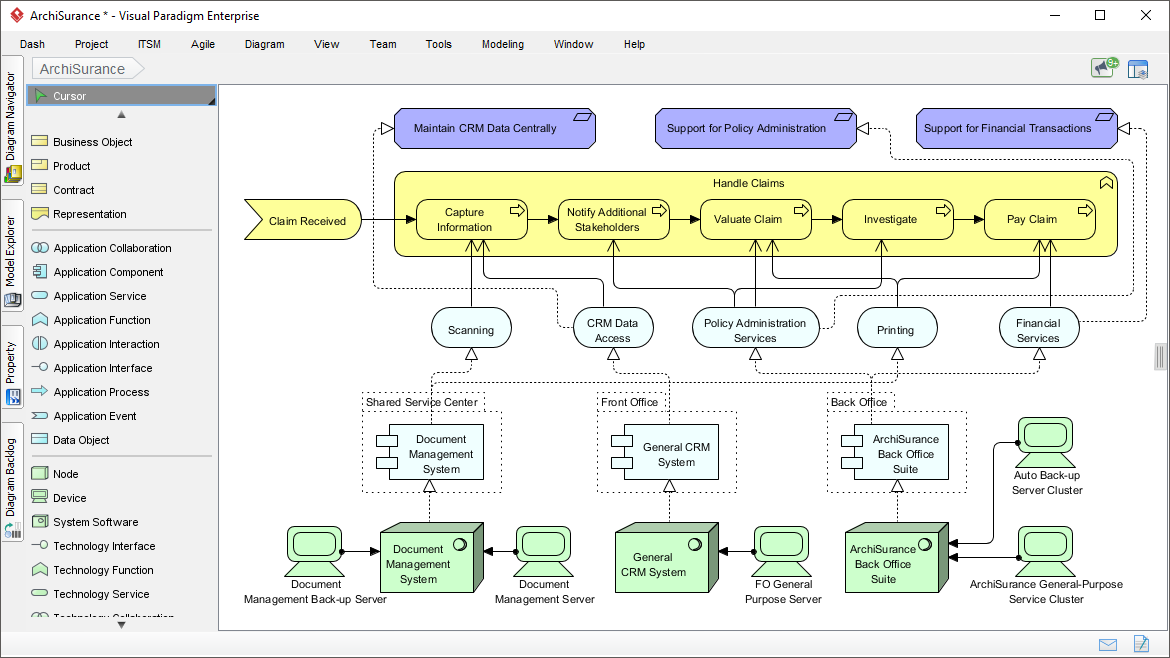
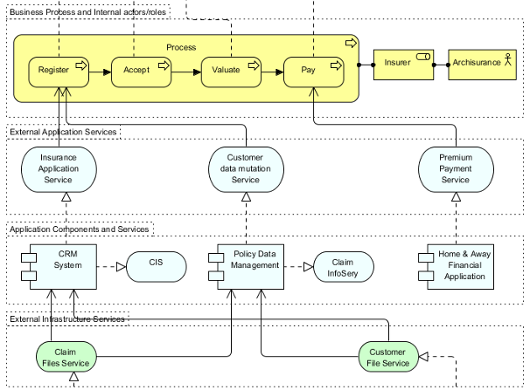
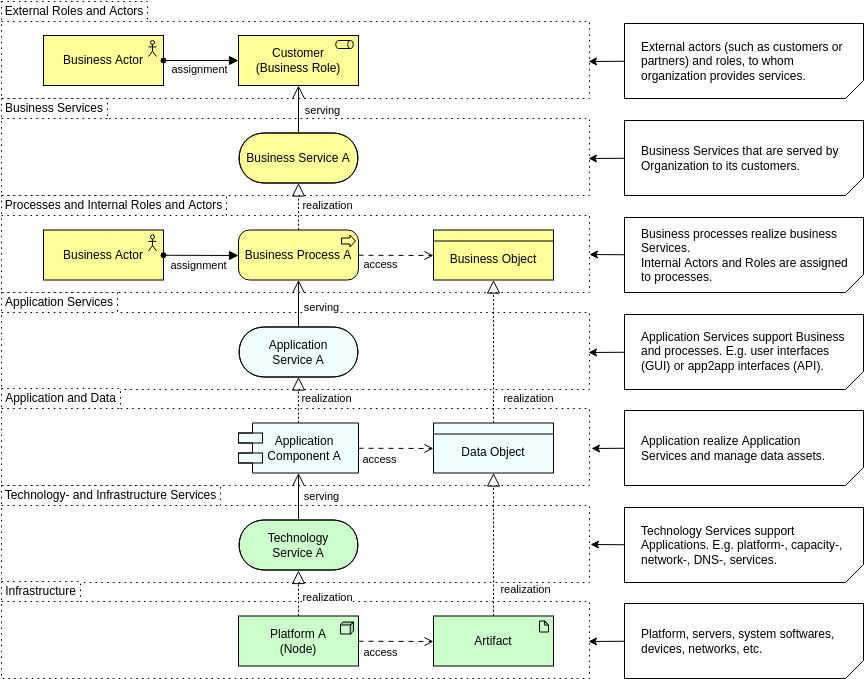
Here are some example screenshots of ArchiMate diagrams and the interface in Visual Paradigm:


Recommended Articles and Tutorials
These official Visual Paradigm resources provide step-by-step guidance, examples, and best practices:
- Comprehensive Tutorial on ArchiMate – In-depth overview of layers, elements, relationships, and useful diagram types with examples. Link: https://guides.visual-paradigm.com/comprehensive-tutorial-on-archimate/
- Full ArchiMate Viewpoints Guide (with Examples) – Detailed handbook covering all 23 official viewpoints, complete with diagram examples drawn in Visual Paradigm. Link: https://www.visual-paradigm.com/guide/archimate/full-archimate-viewpoints-guide/
- ArchiMate Diagram Tutorial – Step-by-step guide on creating diagrams, including online tool access. Link: https://online.visual-paradigm.com/diagrams/tutorials/archimate-tutorial/
- How to Draw ArchiMate Diagrams – Practical tutorial with notations and sample creation. Link: https://www.visual-paradigm.com/tutorials/how-to-draw-archimate-diagram.jsp
- Generate ArchiMate Diagrams and Viewpoints Instantly with AI – Explains the new AI feature for fast generation (updated December 2025). Link: https://updates.visual-paradigm.com/releases/ai-archimate-viewpoints-generator/
- Using ArchiMate with TOGAF ADM – Integration guide for structured EA processes. Link: https://www.visual-paradigm.com/guide/archimate/using-archimate-tool-with-togaf-adm/
Start with the free online tool or trial the desktop version to experiment with the “Coffee Around The Corner” case study – the AI generator can create a baseline model from a simple prompt!