
Introduction
Enterprise architecture (EA) is essential for , ensuring efficiency, and driving innovation. ArchiMate is a powerful, standardized modeling language designed to help architects visualize, analyze, and communicate complex enterprise architectures.
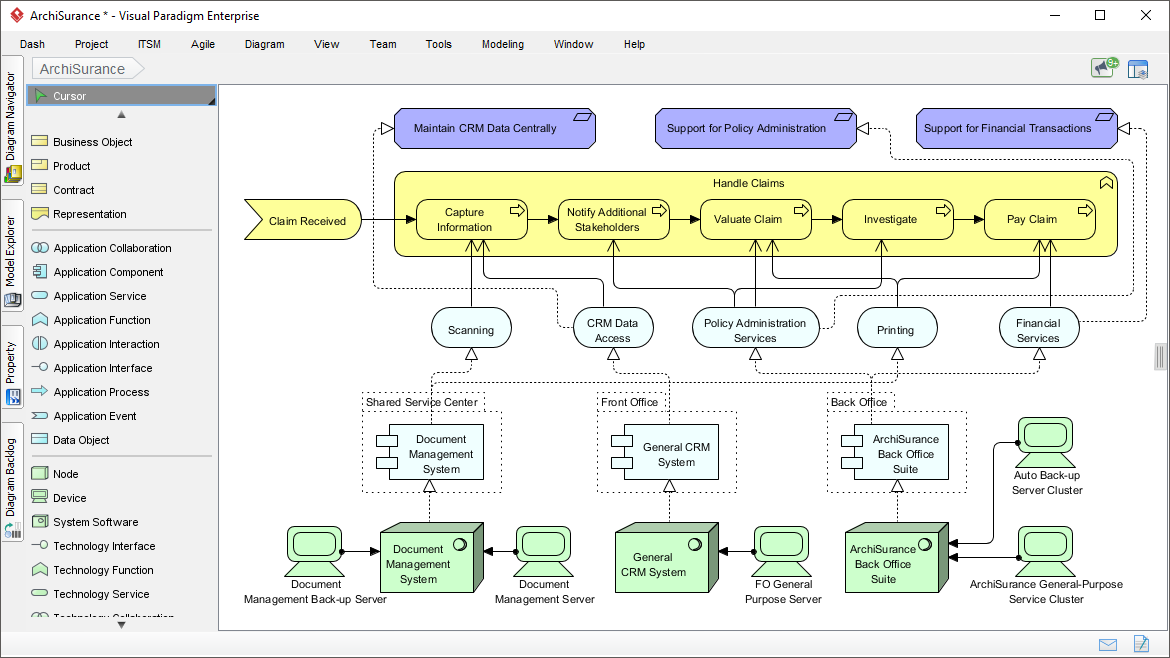
This tutorial will guide you through ArchiMate’s key concepts, layers, aspects, relationships, and viewpoints, with practical examples and actionable insights. By the end, you’ll understand how to use ArchiMate to create clear, effective, and stakeholder-friendly architecture models.
Key Concepts in ArchiMate
1. What is ArchiMate?
ArchiMate is a graphical modeling language for enterprise architecture. It provides a standardized notation to describe, analyze, and visualize relationships between business, application, and technology domains.
- Developed by:
- Purpose: Facilitate communication, decision-making, and alignment between IT and business strategies.
2. Benefits of ArchiMate
| Benefit | Description |
|---|---|
| Standardization | Ensures consistent communication among stakeholders. |
| Holistic View | Helps identify dependencies and impacts across domains. |
| Improved Decision-Making | Supports informed decisions with clear visualizations. |
| Enhanced Collaboration | Provides a common language for architects, IT, and business teams. |
3. Potential Drawbacks
| Drawback | Description |
|---|---|
| Learning Curve | Complex concepts may require training. |
| Overwhelming Complexity | Models can become difficult to manage if not simplified. |
| Lack of Industry-Specific Extensions | May not cover highly specialized domains. |
| Risk of Misinterpretation | Requires clear documentation and training. |
Core Components of ArchiMate
A. Layers
ArchiMate organizes architecture into layers, each representing a different level of abstraction.
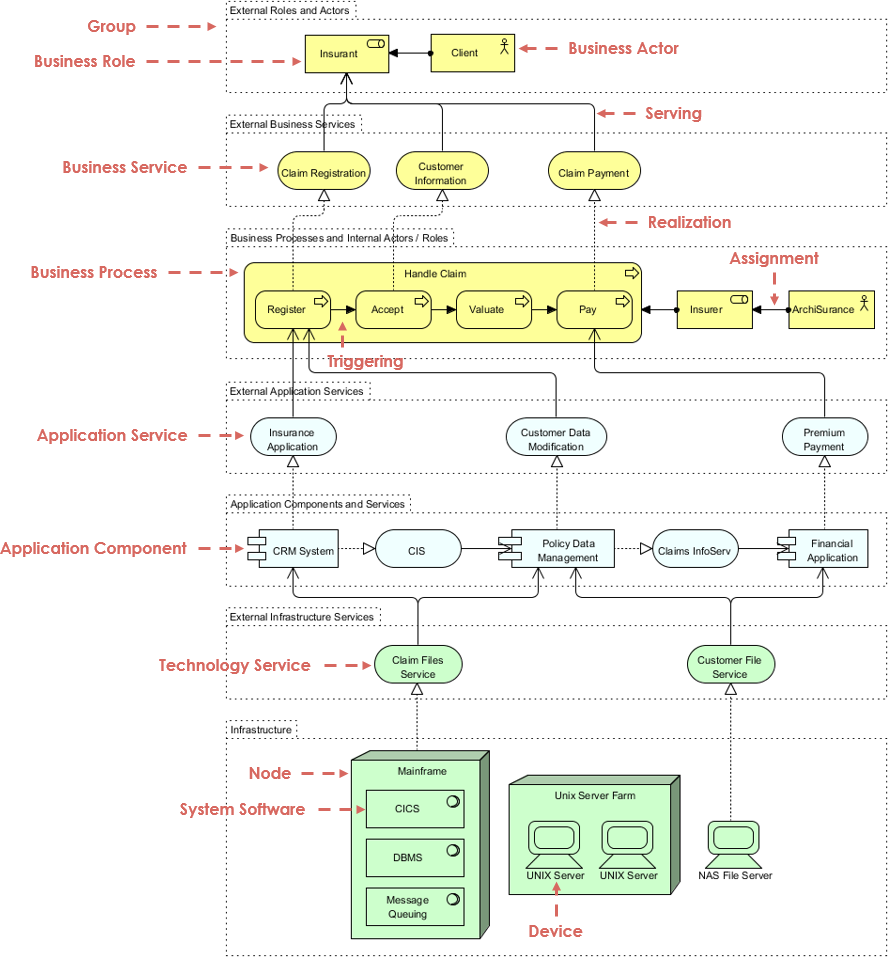
| Layer | Description | Example Elements |
|---|---|---|
| Strategy Layer | High-level business goals, drivers, and capabilities. | Capabilities, Goals, Principles |
| Business Layer | Business processes, actors, and products. | Business Processes, Actors, Services |
| Application Layer | Software applications supporting business processes. | Application Components, Interfaces, Services |
| Technology Layer | IT infrastructure supporting applications. | Servers, Networks, System Software |
| Physical Layer | Physical infrastructure (servers, storage, facilities). | Data Centers, Hardware |
| Implementation & Migration | Manages transformation projects and migration paths. | Work Packages, Migration Paths |
B. Aspects
Aspects provide specialized viewpoints for modeling different perspectives.
| Aspect | Description | Example Elements |
|---|---|---|
| Active Structure | Elements that perform behavior (e.g., actors, roles). | Business Roles, Application Components |
| Behavior | Dynamic interactions (e.g., processes, functions). | Processes, Functions, Services |
| Passive Structure | Data and information objects. | Business Objects, Data Objects |
| Motivation | Drivers, goals, and requirements shaping the architecture. | Stakeholders, Requirements, Principles |
C. Relationships
Relationships define how elements interact.
| Type | Description | Example |
|---|---|---|
| Structural | Static connections (e.g., composition, aggregation). | A “Department” is composed of “Teams.” |
| Dependency | One element relies on another (e.g., “used by,” “serves”). | A “Business Process” uses an “Application Service.” |
| Dynamic | Behavioral or sequential interactions (e.g., flow, triggering). | A “Payment Process” triggers an “Invoice Service.” |
D. Viewpoints
Viewpoints are predefined templates for presenting architecture to stakeholders.
| Viewpoint | Focus Area | Example Use Case |
|---|---|---|
| Business Process | Business processes and dependencies. | Modeling order-to-cash workflows. |
| Application Cooperation | Interactions between application components. | Showing how CRM and ERP systems integrate. |
| Technology | IT infrastructure and dependencies. | Mapping server dependencies for a cloud migration. |
Practical Examples
Example 1:
Scenario: An e-commerce company wants to model its order fulfillment process.
- Elements:
- Business Actor: Customer
- Business Process: Place Order, Process Payment, Ship Order
- Business Service: Order Management Service
- Relationships:
- Customer triggers “Place Order.”
- “Place Order” uses “Order Management Service.”
- “Process Payment” flows into “Ship Order.”
Example 2:
Scenario: A bank wants to show how its mobile app interacts with backend systems.
- Elements:
- Application Component: Mobile App, Core Banking System
- Application Service: Payment Processing, Customer Authentication
- Relationships:
- Mobile App uses “Customer Authentication.”
- Core Banking System provides “Payment Processing.”
Example 3: Technology Layer
Scenario: A company is migrating to cloud infrastructure.
- Elements:
- Technology Service: Cloud Hosting, Database Service
- Node: AWS Server, On-Premise Server
- Relationships:
- AWS Server hosts “Cloud Hosting.”
- On-Premise Server migrates to AWS Server.
Step-by-Step Guide to Creating an ArchiMate Model
Step 1: Define Scope
- Identify the layers (Business, Application, Technology) and aspects (Active, Behavior, Passive) relevant to your project.
Step 2: Identify Elements
- List all actors, processes, applications, and infrastructure involved.
Step 3: Establish Relationships
- Use structural, dependency, and dynamic relationships to connect elements.
Step 4: Choose Viewpoints
- Select the most relevant viewpoints for your stakeholders (e.g., Business Process for executives, Technology for IT teams).
Step 5: Validate and Refine
- Review the model for clarity, accuracy, and simplicity.
- Ensure it addresses stakeholder concerns.
Certification and Learning Resources
- : Offers Foundation and Practitioner levels.
- Recommended Tools: .
Conclusion
ArchiMate is a versatile and powerful tool for enterprise architects. By mastering its layers, aspects, relationships, and viewpoints, you can create clear, actionable, and stakeholder-friendly architecture models.
Key Takeaways:
✅ Use layers to organize architecture by abstraction. ✅ Leverage aspects to model different perspectives. ✅ Apply relationships to show interactions. ✅ Use viewpoints to tailor communication for stakeholders.
Next Steps:
- Practice modeling a real-world scenario (e.g., a ).
- Explore ArchiMate tools to streamline modeling.
- Consider certification to validate your skills.
Final Thought:
“A well-designed ArchiMate model bridges the gap between business strategy and IT execution.”
Would you like a deep dive into a specific layer or viewpoint, or do you have a project you’d like to model using ArchiMate? Let me know how I can help!
Resources and Articles on Visual Paradigm Enterprise Architecture (EA) Visual Modeling Features
Visual Paradigm is a powerful tool for enterprise architecture modeling, supporting standards like ArchiMate, TOGAF, BPMN, and UML. Below is a curated list of resources, including official guides, tutorials, and articles highlighting its visual modeling capabilities such as diagram creation, ArchiMate integration, TOGAF ADM workflows, and general EA visualization techniques. These cover features like intuitive diagramming, relationship mapping, and stakeholder views.
- Learning Guides Overview Comprehensive hub for tutorials on visual modeling, including EA with TOGAF and ArchiMate. Covers diagram layout, element selection, and pinning for precise visualizations. URL: https://www.visual-paradigm.com/guide/
- Comprehensive Guide to Adopting Visual Paradigm for Enterprise Architecture (EA) Modeling Detailed article on key ArchiMate features in Visual Paradigm, benefits for EA adoption, and practical implementation steps for visual modeling. URL: https://archimate.visual-paradigm.com/2025/02/04/comprehensive-guide-to-adopting-visual-paradigm-for-enterprise-architecture-ea-modeling/
- Step-by-Step Enterprise Architecture Tutorial with TOGAF ADM Hands-on tutorial demonstrating Visual Paradigm’s visual modeling for TOGAF phases, including business, data, and technology architecture diagrams. URL: https://www.visual-paradigm.com/guide/enterprise-architecture/step-by-step-enterprise-architecture-tutorial-with-togaf-adm/
- ArchiMate Resources for FREE Free resources on using ArchiMate as a visual language in Visual Paradigm for capturing EA relationships and visualizations. URL: https://archimate.visual-paradigm.com/
- Visualizing Enterprise Architecture: A Practical Guide to ArchiMate and TOGAF Practical guide focusing on Visual Paradigm’s user-friendly interface for ArchiMate diagrams, stakeholder presentations, and EA visualization examples. URL: https://archimate.visual-paradigm.com/2025/02/18/visualizing-enterprise-architecture-a-practical-guide-to-archimate-and-togaf/
- Free UML, BPMN, and Agile Tutorials Collection of step-by-step tutorials on visual modeling techniques, including BPMN for business processes and UML for EA components in Visual Paradigm. URL: https://www.visual-paradigm.com/tutorials/
- General Modeling Techniques in Visual Paradigm Official user guide on core visual modeling features like diagram layout, element selection, and connector management for EA models. URL: https://www.visual-paradigm.com/support/documents/vpuserguide/1283/28_generalmodel.html
- Visual Paradigm Guides Hub Centralized site with guides on AI-assisted diagram generation and advanced EA modeling features in Visual Paradigm. URL: https://guides.visual-paradigm.com/
- Simplify Business Process Modeling with Visual Paradigm’s BPMN Tools Article exploring BPMN visual modeling for EA, including analysis and refinement tools in Visual Paradigm. URL: https://www.cybermedian.com/simplify-business-process-modeling-with-visual-paradigms-bpmn-tools/
These resources are up-to-date as of December 2025 and focus on practical, visual aspects of EA modeling. For hands-on practice, start with the free tutorials on the Visual Paradigm site.